Edit a user
Administrators can edit any user's name, email, roles, and password from the users list.
Open the edit form
- Navigate to Správce → Uživatelé tab
- Find the user in the list
- Click Upravit (Edit) on their row
The edit modal appears with the current user data pre-filled:
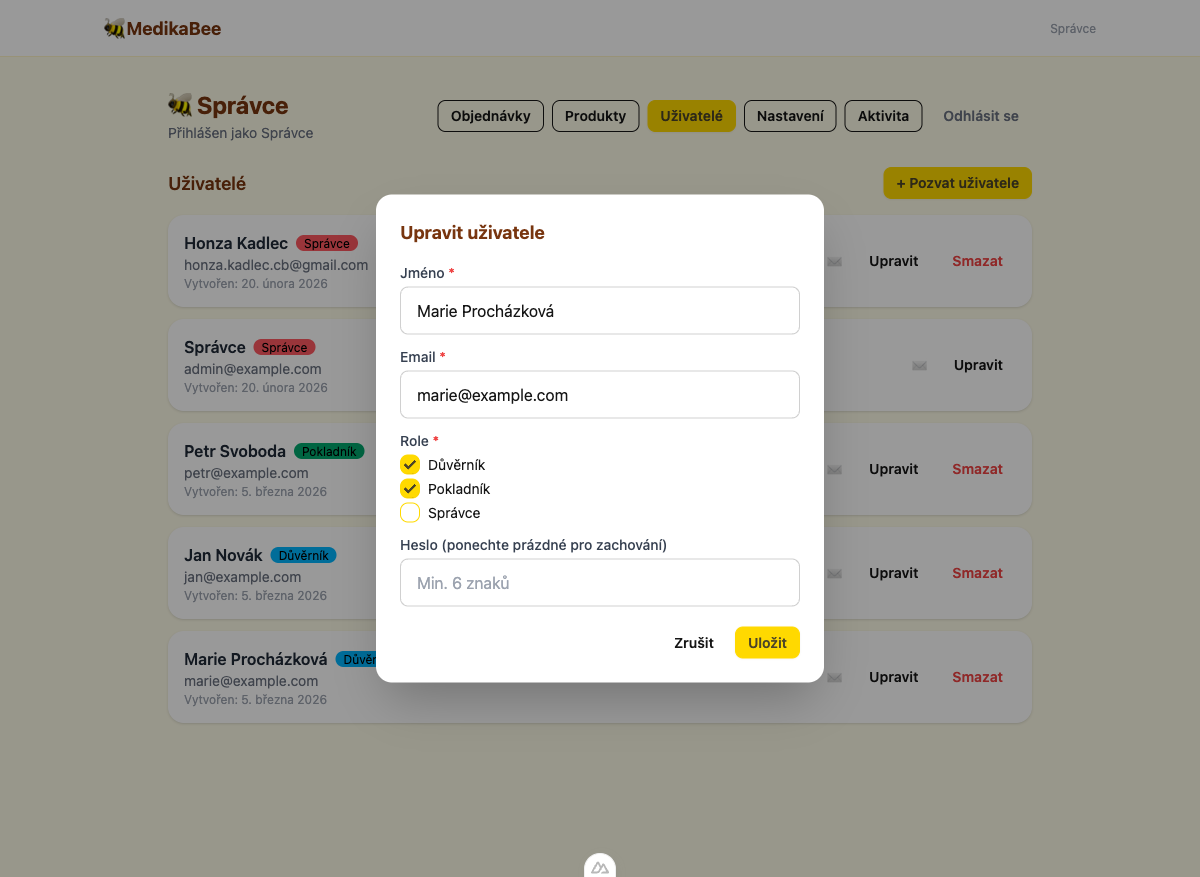
Update user details
Change the name
Update the Jméno field. If the user has the Trustee role, all orders referencing their old name as the trustee will be automatically updated to the new name.
Change the email
Update the Email field. The system checks for duplicates — if another user already has this email, you'll see: "Email je již obsazen".
Change roles
Check or uncheck roles as needed. When roles change, the user receives an automatic email notification about their new permissions.
| Role | Badge color | Description |
|---|---|---|
| Důvěrník (Trustee) | Blue | Order management |
| Pokladník (Treasurer) | Green | Order management |
| Správce (Admin) | Red | Full access |
Change the password
Enter a new password in the Heslo field (minimum 6 characters). Leave it empty to keep the current password.
Save changes
Click Uložit (Save) to apply the changes. The user list refreshes automatically.