Users
Invite a user
Add new users to MedikaBee by sending email invitations
Administrators can invite new users to MedikaBee. The invited user receives an email with a link to set their password and access the system.
Open the invite form
- Navigate to Správce → Uživatelé tab
- Click the + Pozvat uživatele button in the top-right corner
The invite modal appears:
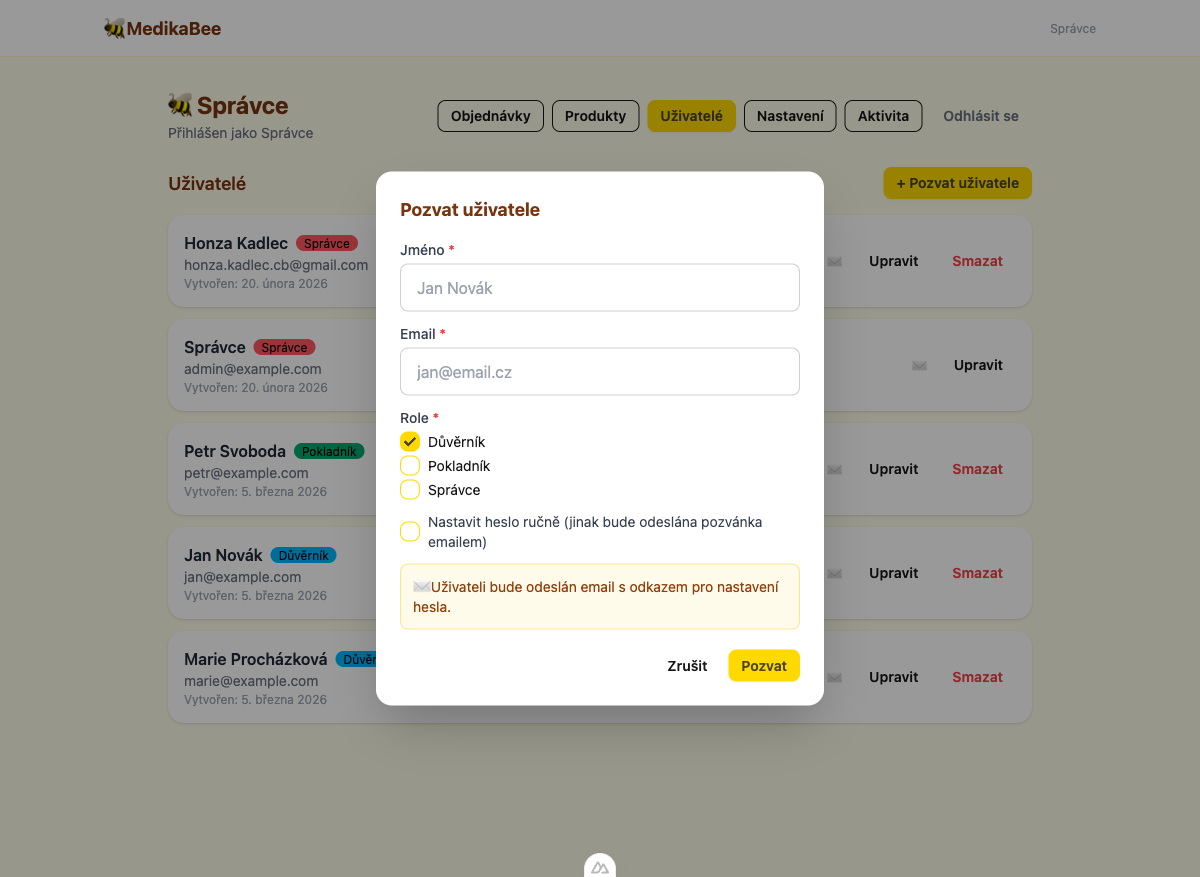
Fill in user details
| Field | Required | Description |
|---|---|---|
| Jméno (Name) | Yes | Full name of the user |
| Yes | Must be unique across all users | |
| Role | Yes | At least one role must be selected |
Select roles
Check one or more roles for the new user:
- Důvěrník (Trustee) — Can view and manage orders
- Pokladník (Treasurer) — Can view and manage orders
- Správce (Admin) — Full system access
Choose a password method
You have two options for setting the user's password:
Send an email invitation (default)
Leave the Nastavit heslo ručně checkbox unchecked. The system will:
- Create the user account without a password
- Generate a secure setup token (valid for 72 hours)
- Send an email with a link to set their password
The email invitation link expires after 3 days. Use the Resend invitation button if it expires.
Set a password manually
Check the Nastavit heslo ručně checkbox to reveal a password field. Enter a password with at least 6 characters. Share it with the user securely.
Submit the invitation
Click Pozvat to create the user. If sending by email, a confirmation toast appears: "Pozvánka odeslána na email".
If the email address is already in use, the system will show an error: "Uživatel s tímto emailem již existuje".